


ESCape Game Studio

**Only a select amount of work created during my time at ESCape Game Studio has been included here. The project did end up having to get cancelled.
Description
Expansion of Monster Tower game.
Objectives
-
Help to redesign screens (character selection, main menu, level screen selection)
-
Create stats and leaderboard screens
-
Create full-scale wireframes (Figma and animating certain UI in engine)
Tools
-
Figma (prototyping and wireframing)
-
UI animation
-
Pen / color pencils and paper
-
GoodNotes
Details
Role: UI/UX Designer (Feb 2025 - July 2025)
Project Name: Monster Tower 2.0
Platform: Mobile (iOS & Android)
Genre: Endless Runner
Length: 6 Months
Overview:
The team at ESCape Game Studio were working on a full-featured expansion of Monster Tower. Monster Tower had already been released, and was only available to play on Android. Monster Tower 2.0 would have been available on iOS and Android, but during development the project was cancelled.
Heroes
I was tasked to redesign the "Heroes" screen. The "Heroes" screen is where players can select which character to play as.
Initial Heroes Screen
This was the initial way players would be selecting one of the characters. There were 21 heroes to select from. I was tasked to redesign this screen.
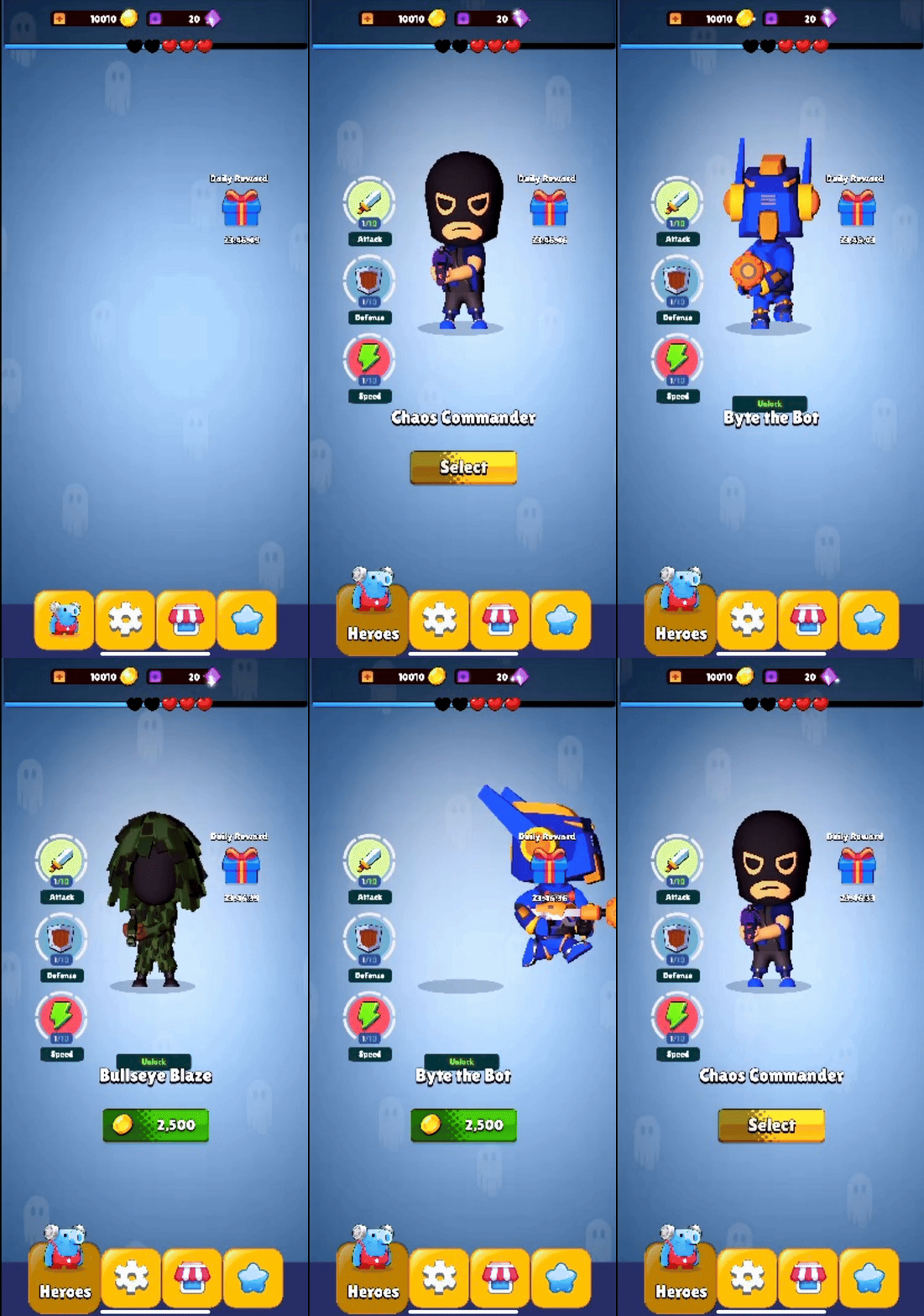
Character selection can be viewed by swiping right or left.
Sketches
Below, are some of the sketches I thought about when thinking about the redesign, I did want to have some way to let players know how many characters there were, and which ones are currently locked.

Sketch 1

Character Selection Screen Sketches

Sketch 1
Final Version
This was the agreed upon iterated redesign sketch of one of my earlier sketches. Lock location is now a different spot. The team later on discussed that the "Daily Reward" would not be in the same location for "Heroes" selection. The implemented version was before the character count was added to the top.

Director implemented the lock and arrows.
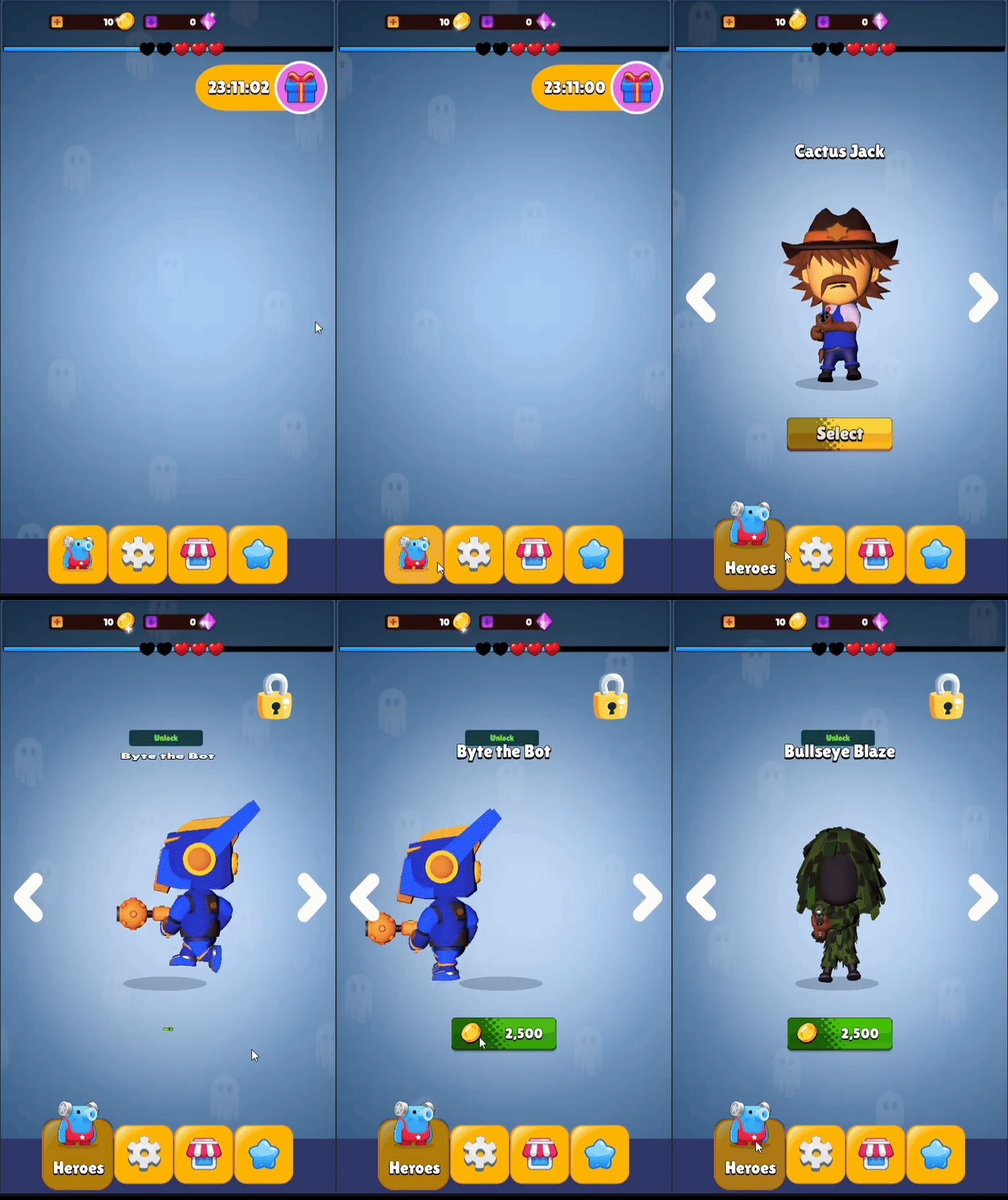
Main Menu
There was open room to add items for the redesign for the main menu because there wasn't that much there to begin with. Items that were added to the main menu was discussed by the team.
Initial Main Menu
This was the initial main menu that I was given to redesign.

Sketches
Below, are some of the sketches that were drawn for the main menu, and other agreed items were added to the sketch after the team discussed what else should be included on the main menu.


Wireframes
Early stages of the wireframes.


Final Version
This was the agreed upon sketch for characters that were locked from the start.
Wireframes
Main Menu


Map/ Level Area Idea


Level Screen
The initial level screen had both completed and uncompleted levels together, but if players were at a much higher level, it would take some to scroll to that higher level. The highest level was 100.
Sketches
These are some other sketches I came up with when I was thinking of other possible design options. I wanted players to have a smoother process when selecting a level, especially if a player was on a much higher level. During this process, I decided to create a "Completed Levels" screen that can be accessed two ways.
1. Access "Completed Levels" by clicking on the map, and selecting "Completed Levels"
2. Access "Completed Levels" by swiping right on the "Main Menu"

Sketch #1
This option would have images of each level that is featured in level screen, the name of the level, and then show the ratings.

Sketch #2
Just goes by level number. It will also disply the ratings.
Wireframes
Alternative methods of how players can view completed levels section of the game. The wireframes pictured below are early stages of the wireframe when thinking about tutorial. The "Completed Levels" background is the same background as the initial level screen. Orange button was to match what was already in place when it came to the orange play button.

Map Tutorial

Map Pop-Up

Completed Levels
One way players could reach the "Completed Levels" screen.
Early stage map layout. Only two areas were on the map during that time.
One of the early options that "Completed Levels" screen could be.
Prototyping
I then prototyped the two different ways players could access the "Completed Levels" section of the game.It started from the main menu and would end at the game screen after the replay pop-up screen.
Leaderboard
In the beginning, there was no leaderboard screen featured on the main menu. So, the team discussed that it should be added to the main menu.
Sketches
Here are a few of the early stage sketches that I came up with when I was thinking of design options. *Not all sketches I had drawn for "Leaderboard" are featured here*

Sketch #1
Kept with the game theme of how the titles are shown.

Sketch #2
Different from the consistent theme that's featured in the game.
Wireframes
Leaderboard
A mix of sticking with the title theme, and also non- theme are featured below. *Not all Leaderboard wireframes are pictured*
Iterations
Iterated Leaderboard
These were after the team discussed
Stats
This was another feature that was going to be on the main menu that was discussed by the team.
Sketches
These are some early sketches I came up with when I was thinking of "Stats". These sketches I stayed with the theme that was already placed in the game where an icon is near the title. *Not all sketches have been included*


Wireframes
Stats
I kept with the theme that was already in place with how the titles would have a banner as well as an icon nearby.
Testing - Round 1
I had gathered 40 players for the first test. The "Hero" image was switched out for the test. The reason was because players can pick profile picture. The team also didn't get to whether or not players would also be able to have a username. So, for this testing round, I had just named it "Character Name" for testing purposes.
Goal
-
See if players preferred to have a consistent theme when viewing certain UI screens in-game
-
Consistent color scheme
Players Tested
Metrics
Results
Overall, players wanted to view something different.
Pop-Up
-
Majority of the player did not want the to have a consistent theme when it came to a replay pop-up UI screen
Level Indicator
-
Majority of players also did not want a consistent theme when it came to the level indicator
-
Re-size certain elements on the screen
40
Qualitative Feedback
Quantitative Feedback
Pop-Up Screen
42.3%
Preferred Non-Themed Option
30.8%
Preferred Consistent Game Theme
27%
Preferred Partial Variation Theme


Level Indicator
58.8%
23.5%
17.6%
Preferred Non-Themed Option
Preferred Consistent Game Theme
Preferred Partial Variation Theme


Testing Round 1 - Iterations
I did iterate designs after compiling the feedback received from the 40 players during testing, and the team at ESCape Game Studio.
Testing Round 1 - Iterations
I did iterate designs after compiling the feedback received from the 40 players during testing, and the team at ESCape Game Studio.

This is the design that was on the sketch that I was given.


This is the design that was on the sketch that I was given.
Testing - Round 2
For the second round of testing, I had gathered the same amount of players as the first round of testing. Similarly to the first round of testing, the second round of testing had to be extended for about another week in order to get all 40 players.
Testing-Round 2 Iterations
While I was iterating designs from the most recent feedback of the 40 players and team's feedback, this was also around the time the cancellation announcement of Monster Tower 2.0 was given.
Lessons Learned
-
The game's theme doesn't have to always be present on certain UI.
-
Majority of the players didn't want certain UI to match with the theme for one screen
-
-
How to animate UI in the engine.
-
Learned more about tooltips, and assisted with development team on what needed to be included to assist players during gameplay.
Other Projects
During the six month I was there, the director had announced to the team the cancellation of Monster Tower 2.0.
Outcome
Results
Overall, players preferred to have an additional solid color that showed the overall stats instead of just having the stats on a blurred end screen.
-
Players found that having additional solid color on top of the blurred background made it more cleaner for players to view
-
Players found it easier to read and understand the results shown
-
Preferred seeing rounded corners than square corners
58.5%
Preferred Solid Background With Overall Stats Over Blurred Background
26.8%
Preferred Solo Blurred Background
14.6%
Preferred Solid Color Background + Level Stats Layer


*Blurred background was changed for testing purposes. It is not the same as the background in the game.

Note
Blurred background that was shown to players was not the same as the one in-game. Replaced background for testing was to something that was similar. There was one level in the game that had a red background.
Goal
-
See if players preferred a blurred end screen to show overall stats.
-
How solid background do amongst the blurred end screen
Players Tested
40
Metrics
Qualitative Feedback
Quantitative Feedback

Floramis (Game UX/UI Design Internship 2022) - Plant simulator game with MOBA gameplay in mini-games.

TravelHG - An information-rich website that focuses on travel and hidden gems in London.
